
A practical return-to-work guide
Returning to Desk Work After Shoulder Surgery:
A Safer Plan That Respects Healing
The first morning back at a desk can feel strangely ordinary. The laptop opens, messages glow, and the familiar little mountain of email waits patiently. Yet beneath the sling, bandage, or healing incision, your shoulder may still be doing delicate biological work that cannot be hurried by a full calendar.
Returning to desk work after shoulder surgery is not simply a question of whether you can type. It involves arm support, pain control, sleep quality, medication effects, commuting, mouse use, reaching, concentration, and the specific structures repaired during surgery. A person recovering from a minor diagnostic arthroscopy may face a very different timetable from someone recovering from rotator cuff repair, labral repair, fracture fixation, or shoulder replacement.
This guide helps you turn a vague question, “When can I work again?” into a safer, more useful plan. You will learn how to judge readiness, prepare your workstation, request temporary accommodations, track delayed symptoms, and recognize when the workday is asking more from your shoulder than it can currently give.
Know your real clock
Understand why the procedure matters more than a generic recovery estimate.
Reduce hidden strain
Fix arm support, mouse placement, reaching, scheduling, and commute demands.
Return gradually
Use symptoms, function, and written restrictions to guide each increase.
🧭 The goal is not to prove that you can endure a workday. It is to build a workday your healing shoulder can safely tolerate.
Article snapshot
This guide is for office employees, remote workers, freelancers, caregivers, and managers planning a return to computer-based work after shoulder surgery. It explains how to compare your job demands with your medical restrictions so you can prepare a safer workstation, request useful accommodations, and create a phased schedule with your surgical team.
Table of Contents
Safety Comes Before Scheduling
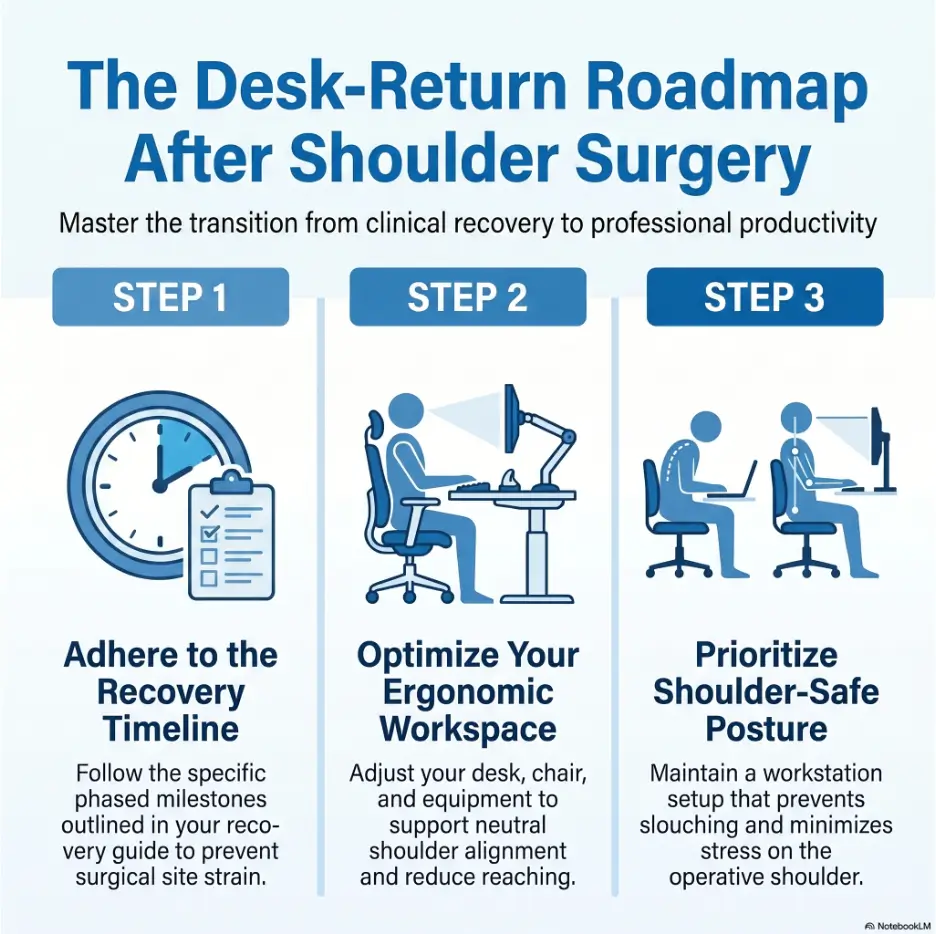
A return date written on a calendar can feel reassuring, but it is only a planning estimate. Your actual restrictions may depend on what the surgeon found, what was repaired, how secure the repair is, whether complications occurred, and how your shoulder responds during the first stages of rehabilitation.
Two people may both say they had “arthroscopic shoulder surgery” while having dramatically different recoveries. One may have had inflamed tissue cleaned up without a major repair. The other may have had a tendon anchored back to bone and been instructed to protect that repair for weeks. The small incisions can look similar even though the work performed underneath them was not.
Medical safety note
This article provides general educational information. It cannot replace your surgeon’s postoperative instructions, physical therapy protocol, medication guidance, driving clearance, or individualized return-to-work documentation. Contact your medical team when your written instructions are unclear or your job duties conflict with your restrictions.
Use the restriction hierarchy when advice conflicts
Recovery advice arrives from many directions. A coworker remembers returning after three days. A relative says the sling should come off whenever it feels uncomfortable. An online forum insists that typing cannot hurt a shoulder because the fingers are doing the work.
When these messages conflict, use a simple hierarchy. Your surgeon’s procedure-specific restrictions come first, followed by the rehabilitation protocol and guidance from the physical therapist working within that protocol. General articles, product advice, workplace anecdotes, and other patients’ experiences belong much lower on the list.
Ask questions that produce usable answers
“Can I go back to work?” is often too broad. A clinician may picture quiet computer work at home, while your actual day includes carrying a laptop, opening heavy doors, commuting through crowded stations, reaching into cabinets, driving between sites, and sitting through long meetings without a place to support your arm.
Describe the job in movements and time demands. Ask whether you may type, use a mouse, remove the sling while seated, carry a bag, reach forward, drive, use stairs, or work continuously for a specified number of hours. Ask whether the restriction applies to the hand, elbow, shoulder, or the entire arm.
Key takeaway
A useful medical release describes permitted hours and movements. A vague note saying “light duty” can leave you and your employer guessing.
Medication and sleep can affect work readiness
A shoulder may feel tolerable while your attention, reaction time, memory, or judgment remains affected by medication, poor sleep, or the physical exhaustion of healing. This matters for more than driving. It can affect financial decisions, safety-sensitive tasks, client communication, data entry, legal work, supervision, and any job where errors carry consequences.
Do not change prescription medication simply to meet a work date without speaking to the prescriber. Instead, tell the surgical team what cognitive demands your job involves and ask how medication timing may affect work and driving.
Your Surgery Type Changes the Return-to-Work Clock
There is no single desk-work timeline for shoulder surgery. The word “shoulder” names a region, not one operation. The procedure may involve bone, cartilage, tendons, ligaments, the labrum, the biceps attachment, the joint surface, or a combination of structures.
Minor procedures may allow relatively quick resumption of limited administrative work when pain is controlled. Repair procedures usually demand more protection because tissue must attach, heal, and gradually tolerate load. Replacement and fracture procedures bring their own precautions.
Minor arthroscopy may permit an earlier return
A diagnostic arthroscopy, limited debridement, or certain decompression procedures may allow some people to resume light desk duties within days or a short number of weeks. Even here, swelling, anesthesia after-effects, sleep disruption, pain, and medication can make an immediate full day unrealistic.
“Earlier” does not mean “effortless.” The shoulder can become irritated when the arm hangs unsupported, when the mouse sits too far away, or when a person remains frozen in one guarded position. A flexible schedule may still be more appropriate than a dramatic return on Monday morning.
Rotator cuff and labral repairs require protection
After rotator cuff repair, the tendon needs time to heal to bone. After labral repair, the repaired tissue and stabilizing structures also need protection. The incision may close long before the internal repair is ready for ordinary loading.
This distinction explains why pain tolerance is a poor substitute for permission. A person may be capable of moving the arm in a way that the repair is not yet meant to tolerate. Conversely, appropriate hand or wrist use may be allowed while the shoulder remains protected, provided the forearm is supported and the movement follows the protocol.
Replacement and fracture surgery follow different rules
Shoulder replacement precautions may limit particular directions of movement, weight-bearing through the arm, lifting, pushing, or pulling. Fracture recovery depends on the bone involved, fixation, healing progress, and whether nearby soft tissue was also injured.
Do not borrow a rehabilitation timetable from a friend who had another operation. Even two shoulder replacements can involve different precautions depending on the surgical approach, implant, anatomy, and surgeon preference.
Use estimates as planning ranges, not promises
| Procedure category | Why desk-work timing varies | Questions to clarify |
|---|---|---|
| Minor arthroscopy or limited cleanup | Pain, swelling, medication, sleep, arm position, and dominant-side use | When may I type, remove the sling, and work partial days? |
| Rotator cuff repair | Tendon-to-bone healing, tear size, repair complexity, and sling protocol | May I use the hand while the forearm is supported? What shoulder motion is prohibited? |
| Labral or instability repair | Protection of repaired stabilizing tissue and limits on rotation or reaching | Which positions place the repair at risk? How long is the sling required? |
| Shoulder replacement | Implant precautions, muscle healing, weight-bearing restrictions, and arm control | May I push from a chair, carry a laptop, or use the arm for transfers? |
| Fracture fixation | Bone healing, fixation stability, pain, stiffness, and associated tissue injury | What lifting or movement limits remain until the next X-ray? |
The American Academy of Orthopaedic Surgeons explains that recovery can be relatively short after a minor arthroscopic procedure but may take several months after more extensive repair. Use its patient education as background, then match it to your own operative instructions.
Key takeaway
The outside of the shoulder can look healed while the repaired tendon, labrum, bone, or muscle is still in an early biological healing stage.
The Real Desk-Work Readiness Test Is Bigger Than Typing
Typing for five minutes at a kitchen table is not the same as completing a workday. Readiness includes the task itself, the length of exposure, the position of the arm, the ability to take breaks, and the symptoms that appear later.
The most revealing question is often not “Can I do it?” but “What does doing it cost me by the end of the day and the next morning?” A task that appears manageable at 9:15 a.m. may produce escalating pain, swelling, guarding, or poor sleep several hours later.
Check function before committing to hours
Before returning, practice a short, medically permitted simulation at home. Sit in the planned position with the arm supported. Open the programs you normally use. Type, read, join a brief call, and move between tasks without reaching beyond your restrictions.
Stop before fatigue turns the test into an endurance contest. The purpose is to observe how the setup behaves, not to prove toughness to an audience of one.
Desk-work readiness checklist
- I have procedure-specific work and sling instructions.
- I can sit with the surgical arm supported without steadily increasing pain.
- I can reach the keyboard, mouse, phone, and water without prohibited shoulder movement.
- I can take scheduled breaks rather than waiting until symptoms become intense.
- My medication and sleep do not make work unsafe or unusually error-prone.
- I have a plan for dressing, transportation, doors, bags, and meals.
- My employer understands my current restrictions.
- I know whom to contact if symptoms worsen or duties exceed the medical note.
Include pain, fatigue, and concentration in the test
Pain consumes attention. So does the constant effort of protecting an arm, adjusting a sling, and avoiding accidental movement. A task that previously required little thought may become surprisingly tiring when part of your attention is stationed at the shoulder like a vigilant night guard.
Consider whether you can follow a meeting, write accurately, make decisions, and communicate calmly while managing symptoms. A phased schedule may be medically and professionally wiser than returning full time and producing work that is slower, less accurate, or difficult to sustain.
Judge the delayed response, not only the immediate one
Some shoulder irritation becomes obvious during the task. Other reactions emerge later, after the protective focus of the workday fades. Watch for increased pain that evening, extra medication use, worse sleep, swelling, hand symptoms, or a noticeable decline in function the following morning.
A mild, temporary change may be expected during recovery, depending on the procedure and rehabilitation stage. A repeated pattern of escalating or lingering symptoms deserves attention. Report the pattern rather than describing one isolated pain number.
Key takeaway
Your shoulder’s response that evening and the next morning may be more informative than how capable you felt during the first hour.
Short Story: The Afternoon That Changed the Schedule
Marcus returned to remote accounting work two weeks after a shoulder procedure. His morning went smoothly. The laptop was close, the sling was on, and he answered email with his non-dominant hand. By lunch, he felt almost triumphant.
At 3 p.m., the ache began. He had been leaning toward the screen, holding his surgical shoulder slightly raised, and reaching across the desk for a calculator. That evening he slept poorly. The next morning, dressing took twice as long.
Marcus did not abandon work. He changed the experiment. His clinician approved shorter shifts, his manager moved meetings out of the afternoon, and he placed every daily item within forearm distance.
The lesson was not that work had injured him. It was that the original dose of work exceeded what his current setup and stamina could comfortably support. Adjusting the dose turned a discouraging day into useful information.
Hidden Workday Stressors That Can Catch You Off Guard
“Desk job” sounds physically light because it does not involve construction materials, patient transfers, ladders, or warehouse loads. Yet a typical office day contains dozens of small shoulder demands. They are easy to overlook precisely because they once felt automatic.
The arm itself becomes a quiet load
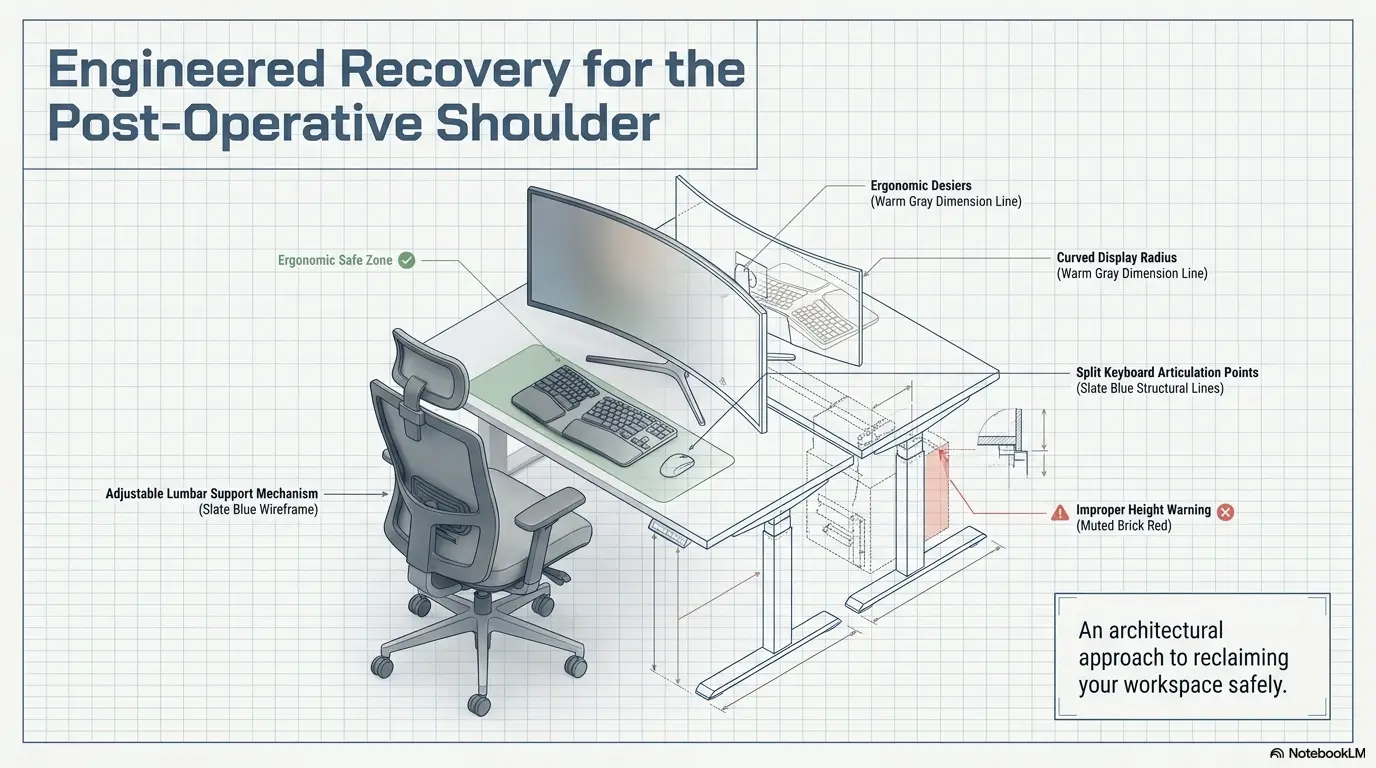
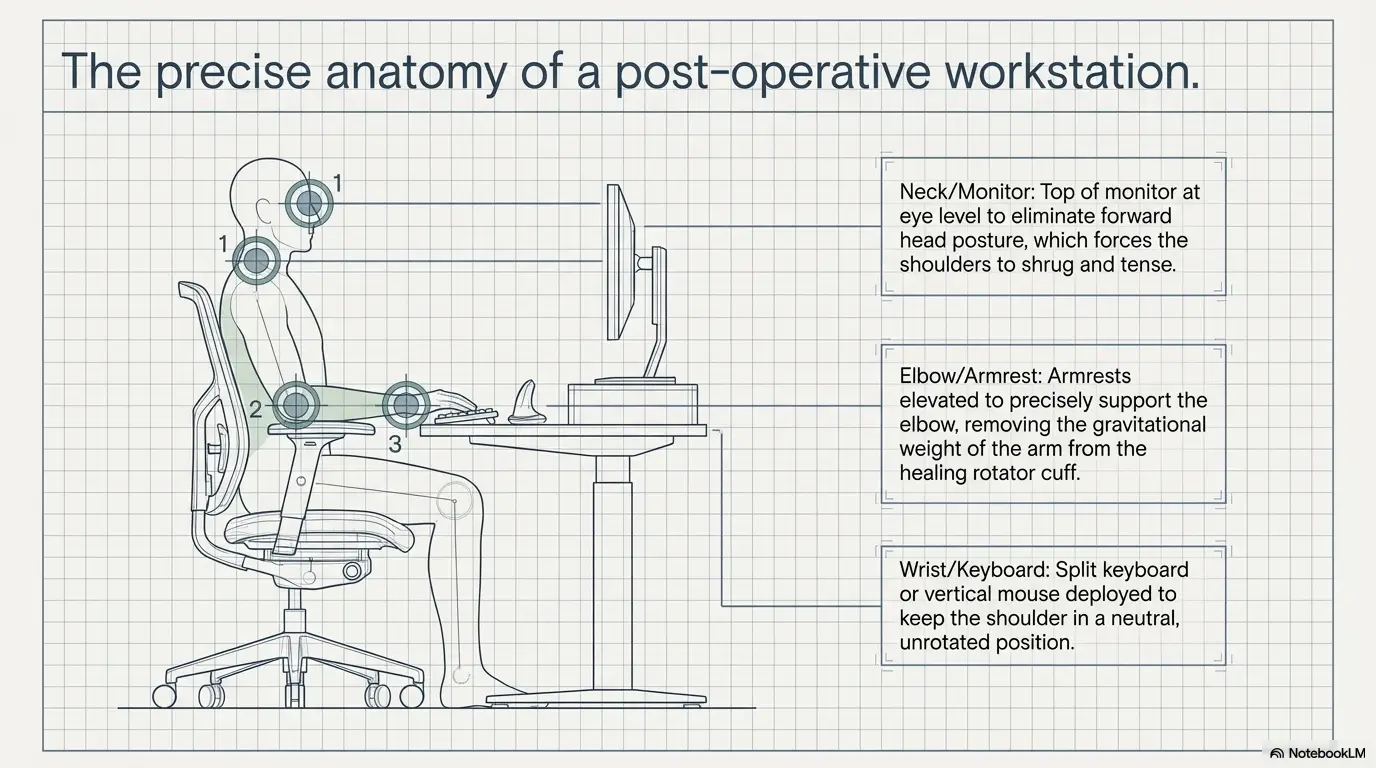
An unsupported arm can pull downward and forward on the shoulder. People often respond by hiking the shoulder, leaning to one side, tightening the neck, or holding the elbow rigidly against the body. These compensations may create soreness around the shoulder blade, neck, forearm, or opposite side.
Support should not force the shoulder upward. The forearm needs a stable surface at a comfortable height, consistent with sling and movement instructions. A folded towel or small cushion can sometimes fine-tune an armrest, but the correct position depends on the surgery and brace configuration.
Mouse use can demand more than keyboard use
A keyboard allows both hands to remain relatively close to the centerline. A mouse is frequently placed farther away, inviting the upper arm to drift from the body and the shoulder to rotate or reach repeatedly. Tiny movements accumulate over hundreds of clicks.
Move the pointing device close to the keyboard. Depending on your restrictions and coordination, alternatives may include temporary non-dominant use, a trackball, keyboard shortcuts, voice control, or a compact keyboard that leaves more room for the mouse.
For a more focused setup discussion, review this guide to a typing setup while wearing a shoulder sling and compare each suggestion with your medical instructions.
The commute may be harder than the desk
Driving requires safe vehicle control, rapid reactions, steering, shifting or control operation, seat-belt management, and the ability to respond during an emergency. Public transportation may involve crowds, standing balance, stairs, sudden braking, turnstiles, bags, and the risk of being bumped.
Then there are doors. A heavy glass door can turn an ordinary entrance into an awkward push-pull problem. Security gates, elevator buttons, coat removal, parking tickets, and carrying lunch also deserve a place in the plan.
Meetings encourage stillness and guarded posture
Video calls can lock the body into one polished square. People avoid shifting because movement looks distracting on camera. They raise the shoulders toward headphones, lean toward the microphone, and stay seated long after the position becomes uncomfortable.
Turn some meetings into audio-only calls when appropriate. Ask for permission to stand, reposition, or briefly turn off the camera. Place notes where they can be viewed without twisting or reaching.
The safer return-to-desk flow
1. Confirm
Get movement, sling, driving, lifting, and hour limits.
2. Map
List typing, mouse, commute, doors, bags, and reaching.
3. Prepare
Support the forearm and bring tools into the safe zone.
4. Reduce
Begin with shorter blocks, lighter duties, and planned breaks.
5. Review
Check evening, sleep, and next-morning symptoms before increasing.
Build a Shoulder-Safe Workstation Before Day One
A workstation should reduce unnecessary movement without forcing you into a rigid pose. The goal is not a showroom-perfect desk. It is a temporary working environment that respects your current restrictions and can be adjusted as recovery progresses.
Create a no-reaching zone
Sit in your planned work position and notice where your non-surgical hand can comfortably reach while the surgical arm remains protected. Place the keyboard, pointing device, phone, water, charger, tissues, medication log, and commonly used papers inside that zone.
Move printers, reference books, file boxes, and spare supplies before returning. The small reach for a charging cable often occurs when attention is elsewhere, which is exactly why it deserves advance planning.
Bring the keyboard and mouse to you
A deep desk can place the keyboard beyond a comfortable range. Bring it toward the front edge while leaving enough space to support the forearms as permitted. A compact keyboard may reduce the distance to the mouse. The monitor should be centered and high enough to discourage leaning, yet not so high that you tilt the head backward.
Laptop-only work often pulls the head and chest forward because the screen and keyboard are attached. An external keyboard with a raised laptop or external monitor may help, provided the arrangement does not create extra reaching. The best equipment is the equipment you can use while obeying your restrictions.
Support the forearm without shrugging
Armrests that are too low allow the arm to hang. Armrests that are too high push the shoulder toward the ear. Adjust the chair or support surface so the forearm rests securely without lifting the shoulder, pressing on the incision, or changing the prescribed sling position.
Check the position after ten minutes, not only when first sitting down. Cushions compress. Bodies slide. A setup that looks correct in a photograph can gradually become a crooked nest of pillows and good intentions.
Use software to reduce repeated movement
Voice dictation can reduce typing for emails and drafts. Keyboard shortcuts can reduce mouse travel. Text expansion tools can insert frequently used phrases. Headsets can prevent the dangerous habit of pinning a phone between the ear and shoulder.
Test these tools before the first workday. Learning voice commands while trying to answer an impatient client is an unnecessarily theatrical way to begin recovery.
Ten-minute workstation reset
- Center the screen directly in front of your usual sitting position.
- Move the keyboard and mouse close enough to avoid forward reaching.
- Adjust the chair so the forearm can be supported without shrugging.
- Place the phone, water, charger, and daily documents within easy reach.
- Remove bags, cables, and boxes from the walking path.
- Test a short email and one common software task.
- Notice whether the shoulder rises, rolls forward, or loses support.
- Take a photograph so the setup can be recreated at work.
Key takeaway
Ergonomic products cannot rescue an eight-hour schedule that your current stamina, medication, sleep, or surgical restrictions do not support.
Use a Graduated Return Instead of an Eight-Hour Test
A full workday is a large dose of sitting, concentration, arm positioning, and repeated small movements. Returning gradually allows you to identify the part of the day that causes trouble before symptoms become a discouraging avalanche.
Start with work blocks rather than one long shift
Your medical team may recommend reduced hours, alternating days, or another phased pattern. Within the permitted schedule, divide work into manageable blocks separated by position changes, walking, prescribed exercises, meals, rest, or icing if instructed.
The break should arrive before pain becomes the manager. A scheduled pause preserves choice. A pain-forced pause often comes after the body has already spent its daily allowance.
Rotate tasks to change the physical demand
Typing, mousing, reading, phone calls, and video meetings load the body differently. Alternate them when possible. Dictate an email, then read a report. Join a call with the arm supported, then take a brief walking break. Avoid stacking several mouse-heavy tasks into one uninterrupted block.
Task rotation should still respect restrictions. A filing task is not a “break” when it requires carrying folders, opening drawers, or reaching overhead.
A sample phased plan to discuss with your clinician
| Stage | Possible work pattern | What to monitor | Reason to pause progression |
|---|---|---|---|
| Preparation | Brief home simulation within medical restrictions | Arm support, medication effects, attention, delayed soreness | Cannot complete basic tasks without prohibited movement |
| Initial return | Shorter shift or limited work blocks | Pain trend, fatigue, swelling, hand symptoms, sleep | Symptoms rise steadily or remain worse the next morning |
| Early progression | Longer blocks with reduced duties | Ability to maintain posture and complete therapy plan | Breaks no longer settle symptoms or duties exceed restrictions |
| Expanded schedule | More hours or responsibilities | Consistency across several workdays | Repeated end-of-week decline or greater medication need |
| Regular schedule | Usual desk hours with remaining movement limits | Function, endurance, recovery after work | New weakness, neurologic symptoms, or loss of function |
This is not a medical timetable. It is a discussion framework. Your surgeon or physical therapist may recommend a faster, slower, or differently structured progression based on the operation and your response.
Increase one variable at a time
Adding hours, commuting, driving, heavier duties, and fewer breaks at the same time makes it difficult to identify which change caused a flare. Increase one major variable, observe the delayed response, and then decide whether to continue.
For example, extend the workday before reintroducing the commute, or test the commute while keeping the workday short. Recovery becomes easier to interpret when you do not change the entire orchestra at once.
Show me the nerdy details
Work tolerance behaves like a dose-response problem. The “dose” includes duration, repetition, posture, reach distance, commute demands, task complexity, and recovery time between shifts. Symptoms may rise when several modest demands are combined even though no single task seems difficult.
That is why gradual progression works best when variables are separated. If you add two hours, resume driving, remove the sling, and handle a backlog on the same day, the resulting symptom pattern offers very little diagnostic value. Change less, observe more, and report the pattern to the rehabilitation team.
Common Mistakes That Quietly Delay Recovery
Most return-to-work problems are not dramatic. They are ordinary habits repeated at high frequency: an arm left unsupported, a laptop carried with the surgical side, a sling removed without permission, or a break postponed because one more email somehow reproduced into twelve.
Mistake 1: Treating pain tolerance as proof of healing
Pain is an imperfect signal. Medication, nerve blocks, individual pain sensitivity, and the type of tissue involved can all affect what you feel. Some prohibited movements may not cause immediate pain, while some permitted activities may still feel sore.
Use restrictions to decide what is allowed. Use symptoms to decide how well the allowed activity is being tolerated. Do not reverse those roles.
Mistake 2: Inventing new sling rules at work
A sling can become hot, awkward, and inconvenient at a keyboard. That does not mean it should be removed whenever work would be easier without it. Some protocols allow removal for specified exercises or hygiene. Others permit hand use while the shoulder remains positioned in the sling. Follow the written rule.
If typing in the prescribed sling position is impossible, the answer may be a different desk setup, reduced duties, voice software, or delayed return. The answer is not to improvise a new rehabilitation protocol beside the office printer.
Mistake 3: Trying to erase the backlog in one marathon
Returning workers often feel guilty about unfinished tasks. They skip breaks, stay late, and attempt to repay absence with intensity. The shoulder does not understand workplace guilt. It only receives the physical dose.
Ask your manager to identify the highest-priority tasks and defer lower-value work. A controlled return protects productivity over the following weeks. A heroic Tuesday followed by an unusable Wednesday is poor arithmetic.
Mistake 4: Letting work displace rehabilitation
Work can feel productive and urgent, while prescribed exercises, appointments, and rest feel negotiable. Yet rehabilitation is part of the recovery job. Schedule it with the same seriousness as a client meeting.
Do not add exercises or perform them at your desk merely because the shoulder feels stiff. Follow the phase-specific program. More movement is not automatically better after a repair.
Mistake checklist
- Using pain tolerance as permission to ignore movement restrictions
- Removing or changing the sling without approval
- Resting the forearm on a surface that pushes the shoulder upward
- Placing the mouse beyond comfortable reach
- Carrying a laptop, purse, backpack, or lunch bag with the surgical arm
- Skipping breaks until symptoms force a stop
- Driving before receiving clearance and regaining safe control
- Replacing prescribed rehabilitation with extra work hours
- Failing to report duties that contradict the medical note
Ask for Work Accommodations Before You Need Them
Temporary accommodations are easier to arrange before the first day than during a painful afternoon. Begin the conversation as soon as you have reasonably specific restrictions, especially when scheduling, equipment, commuting, or task reassignment requires coordination.
Describe limitations in functional language
You usually do not need to narrate every medical detail to a manager. Focus on what you can and cannot safely do: maximum permitted hours, lifting limits, sling requirements, reaching restrictions, driving status, need for breaks, and the date of reassessment.
A note that says “no lifting more than five pounds with the surgical arm, no overhead reaching, sling required except as directed, four-hour shifts for two weeks” is easier to apply than “light duty.” Specific language reduces accidental pressure and workplace interpretation.
Match accommodations to the actual bottleneck
Remote work may remove the commute but leave mouse use, meeting length, and fatigue untouched. An ergonomic mouse may reduce reach but do nothing about medication effects. Reduced hours may help endurance but fail if the worker must carry equipment between rooms.
Choose accommodations by identifying the activity that exceeds current capacity. Possible requests include shorter shifts, flexible start times, remote or hybrid work, fewer consecutive meetings, voice software, closer parking, temporary task reassignment, help with doors and equipment, or relocation of frequently used materials.
Prepare a concise request
Return-to-work request builder
- Duration: State when the temporary restrictions begin and when they will be reviewed.
- Hours: Specify reduced shifts, flexible scheduling, or alternating days if recommended.
- Movements: List lifting, pushing, pulling, reaching, or arm-use limits.
- Equipment: Request an adjustable chair, nearby keyboard and mouse, headset, or dictation access.
- Environment: Ask for remote work, nearby parking, elevator access, or a lower-traffic workstation where appropriate.
- Task changes: Identify duties that should be reassigned rather than silently attempted.
- Breaks: Describe the need for brief position changes, medication timing, or prescribed rehabilitation.
- Review: Set a date for reconsidering the arrangement instead of leaving it open-ended.
Use official workplace guidance when questions arise
Employment rights and documentation procedures vary by country, employer, job, and individual circumstances. In the United States, the Job Accommodation Network provides practical information about workplace accommodations and the interactive accommodation process.
Key takeaway
The best accommodation solves a specific mismatch between your current function and a required duty. “Work from home” is useful only when it solves the actual problem.
Track Symptoms Without Turning Recovery Into a Spreadsheet
Symptom tracking should create clarity, not a second job. You need enough information to identify patterns and communicate with the medical team. You do not need a minute-by-minute chronicle of every twinge.
Use three daily checkpoints
Record a brief baseline before work, a second check after work, and a third the following morning. Include pain, swelling, sleep, hand function, medication use, and one sentence about what the workday contained.
For example: “Worked four hours from home, two video calls, heavy mouse use in the final hour. Pain rose from 3 to 5, settled to 4 after rest, sleep interrupted twice, back to 3 the next morning.” That is more useful than a page full of unexplained numbers.
Track function alongside pain
Pain scores are subjective and can vary with sleep, stress, medication, and context. Function adds valuable detail. Note whether dressing became harder, whether the hand felt clumsy, whether the sling became intolerable, or whether you needed more help with meals and household tasks after work.
A change in function may reveal that the schedule is consuming recovery capacity even when the pain number appears modest.
Use a one-line daily tracker
| Checkpoint | Record | Example |
|---|---|---|
| Before work | Pain, sleep, medication, baseline hand function | Pain 3/10, slept six hours, hand normal |
| After work | Hours, main tasks, symptom change, swelling | Four hours, typing and calls, pain 5/10, no swelling |
| Next morning | Return to baseline, sleep interruption, dressing function | Pain 3/10, one wake-up, dressing unchanged |
| Decision | Maintain, reduce, or discuss progression | Maintain four hours for two more shifts |
For more help turning symptoms into useful medical information, see this guide on how to describe pain to a doctor. Bring a brief pattern summary rather than handing over an unfiltered diary.
Look for the pattern that keeps repeating
One difficult day can have many causes. A consistent pattern is more informative. Perhaps mouse-heavy afternoons repeatedly increase pain. Perhaps commuting is tolerated, but carrying the laptop is not. Perhaps Monday is manageable while symptoms accumulate across the week.
Share the pattern with the surgeon or physical therapist. They can help determine whether the workload, posture, activity selection, rehabilitation phase, or another issue needs adjustment.
Key takeaway
Track enough to reveal a trend: before work, after work, and the next morning. The pattern matters more than a perfectly precise pain score.
When to Seek Help, Stop Work, or Call the Surgical Team
Some discomfort, fatigue, and stiffness may occur during normal recovery, but you should not decide alone that every new symptom is harmless. Your discharge instructions should explain when to call, where to seek urgent care, and what warning signs apply to your procedure.
Stop the activity and contact the surgical team
- Pain becomes suddenly severe or continues to escalate instead of settling.
- You develop new numbness, tingling, weakness, hand clumsiness, or loss of control.
- Redness, warmth, drainage, swelling, or wound changes are increasing.
- You develop a fever or chills as described in your postoperative instructions.
- You fall, experience a sudden pull, or make a movement that may have stressed the repair.
- Your prescribed sling or brace no longer fits correctly or causes concerning pressure symptoms.
- Your work duties cannot be completed without violating a restriction.
- You require progressively more medication to tolerate the same schedule.
Seek urgent medical care for emergency symptoms
Seek emergency help for chest pain, difficulty breathing, fainting, severe allergic-reaction symptoms, sudden confusion, or other rapidly worsening symptoms. Follow the emergency instructions provided by your surgical facility and local emergency services.
Do not assume chest discomfort or shortness of breath is “just from the sling.” Postoperative emergencies require prompt professional assessment.
Treat a duty-restriction conflict as a real problem
If a manager asks you to carry equipment, drive, reach, lift, or work longer than the medical note permits, pause and clarify the situation. Do not silently perform the task and hope the shoulder accepts the negotiation.
Contact the appropriate workplace representative and, when needed, the clinician who wrote the restrictions. A revised note may be necessary when wording is too vague or the employer needs more functional detail.
Keep your discharge instructions available
MedlinePlus provides general shoulder-surgery discharge information, including reminders about wound care, activity, sling use, medication, and reasons to contact a clinician. Your own discharge packet remains the controlling guide because it reflects your procedure.
FAQ
How soon can I return to a desk job after shoulder surgery?
The range may be several days to several weeks or longer, depending on the procedure, tissue repaired, pain control, dominant-arm involvement, sling rules, commute, medication, and available accommodations. Minor arthroscopy may allow an earlier limited return, while tendon, labral, fracture, or replacement procedures often require greater protection. Ask for a procedure-specific estimate.
Can I type while wearing a shoulder sling?
Some protocols permit hand, wrist, or limited elbow use while the shoulder remains protected, but instructions differ. The forearm may need support so typing does not pull the shoulder forward or downward. Confirm when the sling may be adjusted or removed and whether typing is permitted in your current phase.
Is working from home safe immediately after surgery?
Remote work removes commuting and may make breaks easier, but it does not remove medication effects, fatigue, poor sleep, reaching, prolonged sitting, or accidental arm use. Home working is an accommodation, not automatic medical clearance.
Should I use the mouse with my non-dominant hand?
Temporary non-dominant use may reduce activity on the surgical side, but it can slow work and create tension elsewhere. A trackball, compact keyboard, voice control, or keyboard shortcuts may also help. Choose an option that follows your restrictions and does not create a new repetitive-strain problem.
How often should I take a break from the computer?
There is no universal interval. Early in recovery, shorter work blocks with scheduled position changes are usually easier to evaluate than continuous work until pain appears. Ask your therapist how breaks should fit around prescribed exercises, sling use, and current rehabilitation goals.
Can I drive to work while wearing a sling?
A sling, restricted motion, pain, weakness, and sedating medication can interfere with safe vehicle control. Do not drive until your surgeon permits it and you can safely manage the vehicle and respond to an emergency. Insurance and local legal considerations may also apply.
What should I do if my shoulder hurts more after each workday?
Reduce the aggravating demand and contact your surgeon or physical therapist. Report the number of hours worked, tasks performed, symptom timing, sleep changes, and next-morning function. The schedule, workstation, commute, or assigned duties may exceed your current recovery stage.
Can my employer require a full-duty release?
Policies and legal requirements vary. Ask human resources what documentation is needed, and ask the clinician to describe functional restrictions clearly. For individual legal or employment questions, consult a qualified professional or relevant government resource in your location.
Is a standing desk better after shoulder surgery?
Not automatically. Standing may change fatigue or posture but does not fix an unsupported arm, distant mouse, or excessive work duration. Whether sitting or standing, keep permitted tools close, support the forearm appropriately, and change positions according to medical guidance.
Create Your Written Return-to-Work Plan in 15 Minutes
The safest next step is not buying a chair, guessing a date, or testing a full day. It is creating one page that connects your medical restrictions to your actual work.
Take fifteen minutes and divide a sheet into four boxes: restrictions, job demands, temporary changes, and review date. Copy the exact limits from your medical paperwork. Then list the movements hidden inside your day, including transportation, doors, bags, mouse use, meetings, reaching, and the length of uninterrupted work blocks.
Fill in these four boxes
- My current restrictions: Sling instructions, permitted arm use, lifting limit, driving status, movement limits, and maximum recommended hours.
- My actual job demands: Typing, mouse use, calls, carrying, commuting, opening doors, reaching, travel, equipment, and deadlines.
- My temporary changes: Reduced shifts, remote days, task rotation, closer equipment, dictation, help with bags, and scheduled breaks.
- My review point: The date or clinical milestone when the plan will be reassessed.
Give the first shift one modest job
Your first shift does not need to prove that recovery is complete. Its job is to produce information safely. Keep the schedule within the approved limits, use the prepared workstation, and record the evening and next-morning response.
If the shoulder remains reasonably settled and function is stable, you have a foundation. If symptoms climb, you have not failed. You have identified a mismatch that can be adjusted before it becomes a larger setback.
Let healing set the tempo
Work tends to march in straight lines: Monday, deadline, meeting, quarter-end. Recovery moves differently. It advances, pauses, and sometimes asks for a quieter measure before the next phrase begins.
A thoughtful return to desk work after shoulder surgery respects both realities. It keeps you connected to your job without asking healing tissue to follow an office calendar it never agreed to. Start with the written plan, make the first workday smaller than your ambition, and let the next morning help decide what comes next.
Your 15-minute action
Write down your current restrictions, identify three work tasks that may conflict with them, and send one clear message to your clinician, manager, or human resources contact requesting clarification or a temporary adjustment.
Last reviewed: 2026-06