

The Hidden Strain of Your Desk Setup
A desk setup does not have to look disastrous to make your body miserable.
In a typical workday, a keyboard or mouse sitting just a few inches too far away can quietly turn a manageable desk routine into a steady drip of low-back tension, glute irritation, and sciatica-like leg pain by late afternoon.
Most people blame the chair or the vague idea of “bad posture,” when the real problem is often sustained arm reach that pulls the torso forward and the pelvis out of a lower-effort position.
Keep guessing, and you can spend weeks buying ergonomic accessories while the actual trigger stays parked in the same wrong spot on your desk.
This guide helps you spot the chain reaction early, test the right adjustment first, and figure out whether your workstation is aggravating nerve-related symptoms or one-sided mouse strain. Our approach is practical and evidence-minded: watch what your body does over a real work session, not during a polished 30-second posture check.
The first domino is often not where it hurts. Small reach errors add up, but the good news is that small corrections do too.
Table of Contents
Start here first: who this is for / not for
This is for desk workers who notice leg pain, buttock pain, or back tightness get worse during computer time
If your symptoms grow louder during long stretches of typing, mousing, spreadsheet purgatory, or video calls where nobody remembers why the meeting exists, this article is for you. The goal here is not to perform home neurology. It is to understand how a workstation can quietly load the back, hips, and glute area in ways that make sciatica-like symptoms feel worse. If your bigger pattern is repeated office-related flare-ups, you may also want to compare this with a broader guide to desk job sciatica flare-ups.
This is for people wondering why an upper-body setup problem seems to trigger lower-body symptoms
That question confuses many smart people because it feels backward. Your hands are up here. Your leg pain is down there. Surely these things belong in different filing cabinets. But the body rarely respects office departments. A forward reach changes the trunk, the trunk changes the pelvis, and the pelvis changes what tissues spend all day under tension.
This is not for people with sudden weakness, numbness, severe trauma, or rapidly worsening symptoms that need medical evaluation
There is a lane where “adjust the desk and monitor symptoms” stops being responsible and starts being denial in business-casual clothing. MedlinePlus notes that sciatica is a symptom, not a stand-alone diagnosis, and that leg weakness, numbness, tingling, or pain can have multiple causes. It also highlights warning signs around worsening weakness, bladder or bowel problems, or serious injury that deserve medical attention rather than more ergonomic tinkering. If those concerns are on the table, read the warning-sign framework for cauda equina syndrome red flags and the companion overview on when low back pain may be an emergency.
- Use this article for pattern recognition, not diagnosis
- Watch for change over a workday, not just a five-minute chair test
- Respect red flags more than internet confidence
Apply in 60 seconds: Write down where the pain starts, where it travels, and whether sitting, typing, or mousing makes it worse.
Arm reach first, leg pain second: the chain reaction most people miss
How a far-away keyboard pulls your torso out of neutral
When the keyboard lives too far forward, you usually do not notice yourself “reaching.” You notice work getting done. But your body is making deals behind the scenes. The shoulders drift forward, the upper back rounds, and the torso leans just enough to close the gap. OSHA’s computer workstation guidance explicitly warns that a keyboard that is too far away can lead to reaching with the arms and leaning forward with the torso, while better placement helps support more neutral body positions.
How mouse reach can twist the ribcage and shift pressure into the low back
The mouse is often the sneakier villain. Keyboards at least get blamed. The mouse sits off to the side like a harmless spoon, then asks your shoulder, ribs, and trunk to rotate a little thousands of times a day. If you use the mouse more than the keyboard, that asymmetry can become the dominant pattern of the entire workday. It is not dramatic enough for a movie montage. It is exactly dramatic enough to make your back and glute say, “We will invoice you later.”
Why “just your arms” is almost never just your arms
Try this experiment: sit tall, keep your lower back supported, and reach both arms six inches farther than comfortable for 30 seconds. Notice what happens. Your ribcage changes. Your neck joins the argument. Your pelvis starts negotiating. The body prefers coordinated movement, not isolated parts. That is why arm reach can echo downward into the low back, hip muscles, and the tissues around the sciatic pathway.
In plain English: the farther your arms travel from your body, the more likely your trunk and pelvis will “help,” and that help is not always kind.

The hidden culprit is not posture, it is sustained reaching
Why static forward reach can load the back more than people realize
People love to argue about posture because it offers a crisp villain and a crisp cure. Slouch bad. Upright good. Story over. Real life is messier. A position held lightly for ten seconds can feel fine. The same position held for four hours while you answer emails from three departments and one mysterious “quick ask” can feel terrible.
The real issue is often sustained reach. Your hands stay forward. Your shoulders never fully reset. Your trunk remains slightly biased toward flexion or rotation. Muscles that should vary their workload get stuck pulling the same rope all day. Nerves and irritated tissues tend to dislike that sort of monotony.
How tiny shoulder drift turns into pelvic tension over a full workday
I once watched someone fix a “mysterious” afternoon buttock ache by moving a keyboard closer by less than the width of a coffee mug. Nothing glamorous happened. No titanium brace descended from heaven. They simply stopped creeping forward in the chair by 2 p.m. Tiny reach errors multiplied over 6 to 8 hours are often louder than one obviously bad posture snapshot.
Let’s be honest, most desks are set up for the furniture, not the human
Many desks are too deep, too high, or arranged around monitor aesthetics rather than arm mechanics. OSHA also notes there is no single perfect setup for everyone, but it emphasizes goals such as relaxed shoulders, elbows close to the body, back support, and feet supported rather than one rigid “correct posture.” If your workstation problems extend upward as well, that same logic often overlaps with neck and shoulder pain from laptop work and the trade-offs in laptop stand vs external monitor setups.
Show me the nerdy details
From a biomechanics point of view, forward reach increases the moment arm from the shoulder and often nudges the thorax and lumbar region into compensatory positions. That can change how much low-level muscle activity the trunk must sustain. The point is not that one keyboard position “causes” nerve compression in a simple way. The point is that sustained reach can raise the mechanical and muscular cost of sitting, which may aggravate symptoms in people who are already sensitized.
- Static reach matters more than one posed photo of “good posture”
- Minor shoulder drift can become major pelvic fatigue
- Comfort is usually found through lower effort, not prettier form
Apply in 60 seconds: Sit back in your chair and see whether your hands can still rest on keyboard and mouse without your shoulders drifting forward.
Keyboard too far away? Here is what your hips may be doing instead
Sliding forward in the chair to chase the keys
This is one of the most common compensations and one of the least noticed. Instead of bringing the keyboard to you, your body brings you to the keyboard. You gradually scoot away from the backrest. Lumbar support disappears. By lunchtime you are sitting on the front half of the chair like a commuter waiting for a train that never arrives.
Tucking or tilting the pelvis without noticing
Once you lose back support, the pelvis starts doing improvised theater. Some people tuck under and flatten out. Others tip forward and brace through the low back. Neither is a moral failure. It is just the body trying to create enough arm reach to keep working. The catch is that these strategies can increase hip and low-back tension, especially if you stay there for hours.
Losing back support and asking the sciatic pathway to absorb the cost
If you already have an irritable low back, a sensitive glute area, piriformis-related pain, or a history of disc-related symptoms, that unsupported seated position can become the exact kind of low-grade aggravation that accumulates. MedlinePlus describes sciatica as pain, weakness, numbness, or tingling in the leg caused by pressure on or injury to the sciatic nerve, and notes the pain is often one-sided and may worsen with sitting. Readers trying to sort labels may also find it useful to compare sciatica vs piriformis syndrome and the broader distinction between sciatica vs herniated disc.
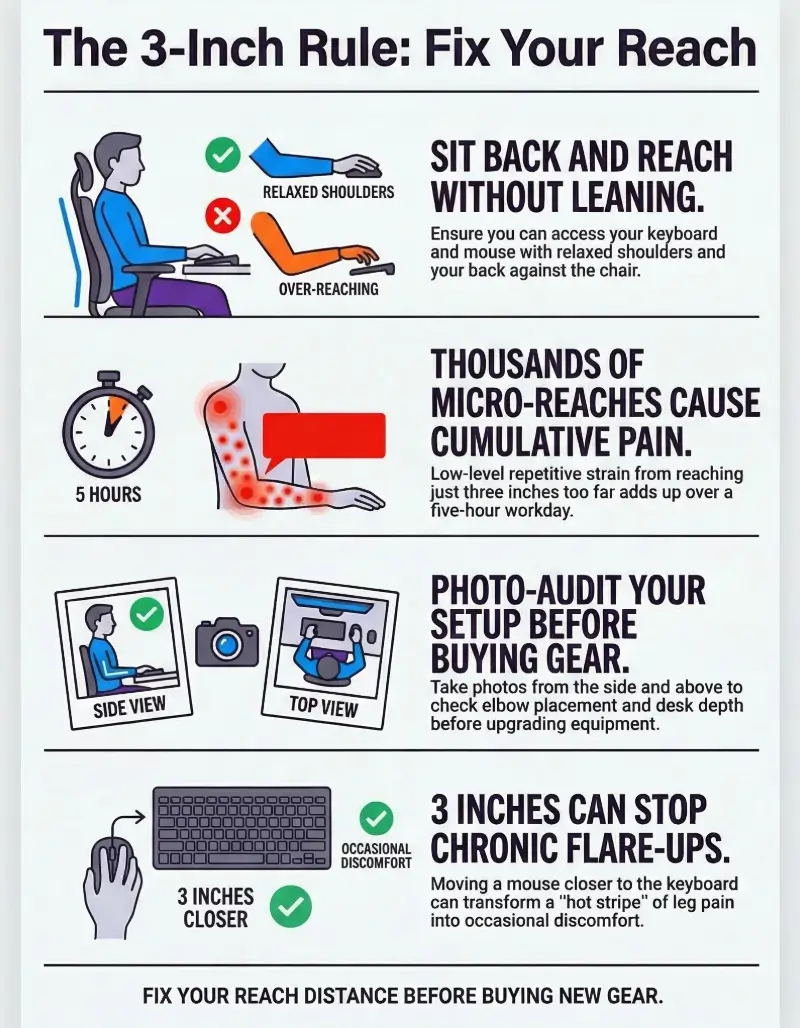
Infographic: how a desk reach problem can travel down the chain
This is not a diagnosis map. It is a practical aggravation map.
- OSHA: Keyboard placement and neutral arm position for computer workstations
- OSHA: Good working positions for seated computer use
- MedlinePlus: Sciatica overview, symptoms, and when to take warning signs seriously
Mouse placement mistakes that quietly increase one-sided leg discomfort
Reaching out to the side and rotating through the trunk all day
If the mouse sits far from your midline, your dominant side does extra work all day. The shoulder abducts. The ribs rotate. The trunk subtly follows. That is a lot of one-sided repetition layered onto a seated spine. People are often surprised when their right leg symptoms correspond with a right-handed mouse habit, not because the relationship is simple, but because the whole side of the body has been living in a gentle twist for months.
Using the mouse on a higher surface than the keyboard
A slightly higher mouse surface sounds trivial until you live there 7 hours a day. Now the shoulder hikes, the neck stiffens, and your forearm loses easy support. OSHA’s keyboard and position guidance emphasizes relaxed shoulders, elbows close to the body, and forearms roughly parallel to the floor during computer work.
Resting weight into one hip while the dominant arm works
Here is the slyest compensation of all: you lean into one hip to make side reach feel easier. I have seen this in home offices, corporate offices, coffee shops, and one truly alarming kitchen-island workstation. Over time, that side-bias can make one buttock, one hamstring, or one leg grumble long before the other side sends a formal complaint.
Decision card: If your pain is clearly one-sided, do not just inspect the painful side. Inspect the side that controls the mouse.
Neutral action: compare mouse placement before you compare products.
Do not do this: common ergonomic “fixes” that can backfire
Pulling the chair closer while leaving the monitor and mouse in awkward positions
This creates a comedy of errors. You solve one reach issue, then crane the neck or shove the mouse into a weird side pocket of space. Ergonomics is a system. When one component moves, the rest of the cast should at least get a note from the director.
Forcing an exaggerated upright posture that creates bracing instead of support
There is a version of “sit up straight” that turns people into tense decorative columns. The shoulders pull back too hard. The ribs flare. The low back over-arches. Everything looks disciplined and feels exhausting. Neutral should feel lower effort, not like you are auditioning for the role of Very Responsible Statue.
Buying accessories before checking reach distance and elbow position
Accessory shopping is soothing because it feels like progress. Wrist rest. Cushion. footrest. split keyboard. heroic water bottle. But if the keyboard is still too far away and the mouse still lives in another postal code, you may only be decorating the problem. That is especially true when you are torn between support products such as a seat cushion vs lumbar roll for sciatica before testing whether the reach pattern is the bigger culprit.
Eligibility checklist:
Yes or no: Can you sit back against the chair and still reach both keyboard and mouse without leaning forward?
Yes or no: Are your shoulders relaxed rather than floating upward?
Yes or no: Are your elbows roughly by your sides rather than winging outward?
If you answered “no” to even one, fix placement before buying gear.
Neutral action: retest after one full work block.
Common mistakes: why desk workers keep solving the wrong problem
Focusing only on lumbar cushions while ignoring arm reach
Lumbar support can help. It just cannot win a wrestling match against a desk that keeps pulling you forward. If your hands cannot work comfortably while your back stays supported, the cushion becomes a suggestion, not a solution.
Adjusting chair height but not desk depth
Chair height gets all the celebrity attention because it is easy to change. Desk depth is the quieter variable that often drives the whole mess. A deep work surface can trap the keyboard and mouse farther away than your body wants, especially if the desk also has a monitor stand, decorative shelf, or enough office clutter to qualify as an archaeological site.
Treating pain like a leg-only issue when the workstation drives the pattern
The leg is where the alarm rings. It is not always where the problem starts. I remember working with someone who had spent weeks foam rolling the hamstring that “must be the issue.” The bigger issue was that she had been using a trackpad and external mouse in an awkward split arrangement that kept her torso slightly rotated all day. We changed the layout first. The leg stopped being the sole scapegoat. The same “wrong culprit” problem shows up when people confuse joint referral patterns, which is why some readers need a cleaner look at hip vs spine pain before deciding the desk is the whole story.
- Check desk depth, not just chair height
- Fix the relationship between chair, keyboard, mouse, and monitor together
- Look upstream from the painful area
Apply in 60 seconds: Remove one object that forces your keyboard or mouse farther away than necessary.
Here is what no one tells you about “neutral position”
Neutral is not a frozen pose, it is a low-effort working range
This matters so much. Neutral is not a museum pose you hold perfectly until retirement. It is a range where the joints, muscles, and support surfaces ask for less effort. OSHA’s workstation guidance even notes that remaining in the same posture for prolonged periods is not healthy and encourages changing position frequently through the day. For some people, that leads naturally into questions about a sit-stand schedule for desk job sciatica rather than a single perfect chair position.
Elbows close to the body can reduce reach-driven compensation
When the elbows stay relatively near the torso, the trunk usually has less reason to join the task. That means less forward drift, less rib twist, and often less scooting forward out of the chair. OSHA specifically describes upper arms hanging normally at the side, elbows close to the body, and shoulders relaxed as part of a better computer working position.
Small placement changes often matter more than dramatic posture resets
A two-inch change in keyboard distance can beat a heroic vow to “sit correctly forever.” One is mechanical. The other is theater with lower-back consequences.
Mini calculator:
If your keyboard is 3 inches farther away than comfortable, and you type or mouse for 5 hours, ask yourself: how many small forward reaches or sustained forward moments did that create today?
You do not need an exact number. You only need to respect that thousands of low-level repetitions add up.
Neutral action: change the distance first, then judge the outcome after a normal day.
Keyboard and mouse placement that usually reduces strain fastest
How close the keyboard should sit relative to your torso
There is no magical centimeter that fits every body, but there is a dependable principle: the keyboard should be close enough that you can use it while your elbows stay near your sides and your back remains supported. OSHA says elbows should be about the same height as the keyboard and hang comfortably at the side of the body.
For many people, that means the front edge of the keyboard sits near enough that the forearms can rest lightly or be supported without reaching. The test is functional, not decorative: can you type without chasing the keys?
Where the mouse should live so your shoulder does not drag the rest of you with it
The mouse should live close enough that you do not have to abduct the shoulder or rotate the trunk to reach it. Ideally it sits next to the keyboard, on the same working surface and at a similar height. When possible, do not exile it to a raised side shelf or a far corner of the desk like a disgraced court official.
Why forearm support can matter more than wrist gadgets
Forearm support can reduce the need to hold the arms in space. That often does more for the shoulders and upper trunk than a wrist cushion ever could. OSHA’s evaluation guidance also notes that armrests, if used, should support the forearms during computer tasks without interfering with positioning. If you are debating equipment changes, this is also where the comparison between an ergonomic chair vs standing desk can become more useful than one more tiny accessory purchase.
| Setup element | Usually better sign | Warning sign |
|---|---|---|
| Keyboard distance | Back stays supported while typing | You lean or scoot forward |
| Mouse position | Elbow stays close, shoulder relaxed | Arm reaches out, trunk rotates |
| Forearm support | Arms feel light rather than suspended | Shoulders creep upward by midday |
Neutral action: choose the one setup variable that most clearly changes whether your back stays supported.
When the desk is too deep: practical workarounds for real offices and home setups
Bringing input devices forward without rebuilding the whole workspace
Real desks do not always cooperate. Maybe you are at a corporate hot-desk. Maybe you are using a dining table. Maybe your home setup is technically a desk but spiritually a storage unit. You do not need a full renovation to improve reach. Often the fastest win is simply moving the keyboard and mouse to the front zone and relocating less-used items farther back.
Using a tray, desk extender, or surface rearrangement strategically
A keyboard tray can help when the work surface or chair cannot be adjusted well enough. OSHA notes that a tray may be needed in some cases, provided it offers adequate space and clearance.
That said, not every tray is a hero. A flimsy tray that wobbles like a ferry in rough weather may simply create a new problem. The point is to reduce reach and support the arms, not to add a new source of daily irritation.
What to move first when you can change only one thing
Move the devices you use most. For many people, that is the mouse first, or the keyboard-and-mouse pair together. If the monitor becomes slightly less elegant for a day, that is survivable. Your body is not required to honor your desk’s interior design plan.
Quote-prep list:
Before you compare trays, armrests, or desk extenders, gather: desk depth, chair armrest clearance, where your elbows land when relaxed, and whether the mouse sits higher than the keyboard.
Neutral action: take one photo from the side and one from above before buying anything.
Short Story: The three-inch rescue
A reader once described her workday with the kind of exhausted precision that tells you she had already tried everything polite. The pain began as a tug in the right buttock around 11 a.m., became a hot stripe down the back of the leg by 3 p.m., and peaked during those final answer-all-the-emails hours when nobody is truly thinking clearly. She had a supportive chair, a decent monitor, and enough lumbar accessories to stock a small boutique. What she did not have was a reachable mouse.
It sat beyond a notebook, beside a coffee mug, at a slight side angle, on a surface just high enough to lift the shoulder. We moved the mouse beside the keyboard, pulled both forward, and cleared one square foot of desk space. That was it. Not a miracle. Not a cure. But by the end of that week, the 3 p.m. flare had become occasional instead of inevitable. Three inches is not a lot in architecture. In desk biomechanics, it can feel like a treaty.
Not all leg pain is “sciatica”: when your setup may be aggravating something else
Sciatica-like pain versus general low-back and glute referral
People often use “sciatica” as shorthand for any pain that starts in the back, buttock, or leg. Sometimes that is close enough for conversation. It is not precise enough for self-management. MedlinePlus explains that sciatica refers to pain, weakness, numbness, or tingling related to the sciatic nerve and that it is a symptom of an underlying problem rather than a condition by itself.
That matters because some desk-related aggravation may be more about low-back referral, glute irritation, hip tension, or sensitivity from prolonged sitting than a clean sciatic nerve story. Your setup can worsen symptoms without being the root cause. If the distinction is muddy, it can help to review how sciatica nerve pain differs from ordinary soreness, or how nerve pain vs muscle soreness after physical therapy is often described.
Why self-diagnosing from social media clips can waste weeks
The internet loves dramatic certainty. “If your second toe twitches when you sneeze, it is definitely X.” Life, sadly, is less cinematic. Pain patterns overlap. Some people feel burning. Others feel numbness. Others just get a deep ache that behaves badly with sitting. When the labels get sloppy, the solutions often do too.
Pain patterns that deserve more caution, not more ergonomic tinkering
If the pain is rapidly worsening, spreading with new weakness, interrupting walking in a serious way, or paired with bowel or bladder changes, that is not the moment to spend another weekend comparing keyboard trays like a sommelier of office equipment. MedlinePlus flags worsening numbness or weakness and bowel or bladder control problems as warning signs that need prompt medical attention.
- Sciatica is a symptom label, not a full explanation
- Leg pain can be nerve-related, referred, muscular, or mixed
- When symptoms escalate, caution beats cleverness
Apply in 60 seconds: Note whether your symptoms are one-sided, whether they include tingling or weakness, and whether sitting clearly worsens them.
When to seek help: signs this is bigger than workstation friction
Symptoms that persist despite setup changes and movement breaks
If you improve reach, restore back support, take movement breaks, and the symptoms still hold steady for days or weeks, the desk may not be the main driver. That does not mean your adjustments failed. It means you learned something useful: the workstation was not the only lever.
Red flags such as worsening numbness, weakness, or bowel/bladder changes
This is the section where restraint matters more than clever phrasing. MedlinePlus notes that serious back-pain warning signs can include worsening leg weakness or numbness, difficulty walking and loss of balance, inability to control urine or stools, fever, and serious recent injury. Those are medical-evaluation signals, not “let me troubleshoot for another month” signals.
When an ergonomic adjustment should be paired with clinical guidance
Sometimes the best answer is both-and. Improve the workstation and get evaluated. This is especially true when the pain interferes with sleep, function, walking, or confidence in everyday movement. A good clinician can help sort whether you are dealing with disc-related irritation, muscular referral, hip-related pain, piriformis-related issues, or something else entirely. If symptoms have crossed from “annoying” into “not settling,” the next useful reading step may be whether failed conservative care for MRI approval applies, or whether the gap between pain and findings sounds familiar in MRI pain mismatch.

FAQ
Can a keyboard being too far away really make sciatica feel worse?
It can aggravate symptoms for some people because extra reach often pulls the torso forward, reduces back support, and changes pelvic position. That does not prove the keyboard is the root cause of true sciatica, but it can absolutely make an irritable pattern more irritable.
Why does my leg hurt more after using a mouse for several hours?
Long mouse use can create one-sided shoulder, rib, and trunk loading, especially if the mouse sits too far away or too high. That asymmetry can spill into the low back, glute area, and leg by the end of the day.
Is it better to move the chair closer or move the keyboard closer?
Usually move the keyboard and mouse closer first, then make sure the chair position still works with the monitor and desk height. Pulling only the chair closer can create new neck, shoulder, or monitor-distance problems.
Can bad desk posture irritate the sciatic nerve without a new injury?
It may aggravate symptoms without any dramatic new injury, especially if you already have a sensitive low back or nerve-related issue. Think aggravation more than instant cause-and-effect.
Should my elbows stay tucked close to my body while typing?
Close, yes. Glued like a penguin in a business meeting, no. The goal is relaxed shoulders and low-effort reach, not a rigid pose. OSHA guidance supports elbows near the body and relaxed shoulders during keyboard work.
Does a keyboard tray help with lower back or leg pain?
It can help if it meaningfully reduces reach and lets your arms work with less effort. It is useful when desk height or depth is the real barrier. It is less useful when it is unstable, cramped, or added without fixing the overall layout.
Why does one-sided mouse use seem to worsen pain on only one leg?
Because the whole side of the body can organize around the dominant-arm task. One-sided trunk rotation, hip loading, and leaning patterns can all accumulate on the same side over time.
Can armrests help reduce sciatica symptoms at a desk?
They can help indirectly if they support the forearms without pushing the shoulders up or preventing you from getting close enough to the desk. Helpful armrests lower arm effort. Unhelpful armrests just become furniture with opinions.
Next step: the one adjustment to test today before changing everything else
Pull the keyboard and mouse closer so your elbows stay near your sides for one full work session
If you test only one thing today, test this. Bring the keyboard and mouse forward enough that you can sit back in the chair, keep the shoulders relaxed, and work with the elbows near your sides. Then leave it that way for a full real-world session, not a ceremonial 90-second trial while you are trying to “feel ergonomic.”
Recheck whether your back stays supported without scooting forward
This is the curiosity loop from the beginning, now closed: the pain may speak in the leg, but the first lever is often the reach. If moving the devices closer allows your back to stay supported and your pelvis to stop improvising, you have changed the chain reaction at its first visible hinge.
Track whether leg symptoms change by the end of the day, not just in the first five minutes
The best ergonomic tests are boring and honest. They survive email, deadlines, bad meetings, and ordinary human distraction. Watch what happens after 4 to 8 hours, not just after one mindful minute. If symptoms improve, you found a real lever. If they do not, that is useful information too. And if your next question becomes “what should I change after the desk itself,” the most natural follow-up is often a structured look at standing desk use for sciatica or a more deliberate sit-stand schedule for desk job sciatica.
- Bring keyboard and mouse into a low-effort zone
- Keep the back supported during actual work
- Judge outcomes by the end of the day
Apply in 60 seconds: Clear the front edge of your desk and pull both input devices forward now.
Last reviewed: 2026-03.