
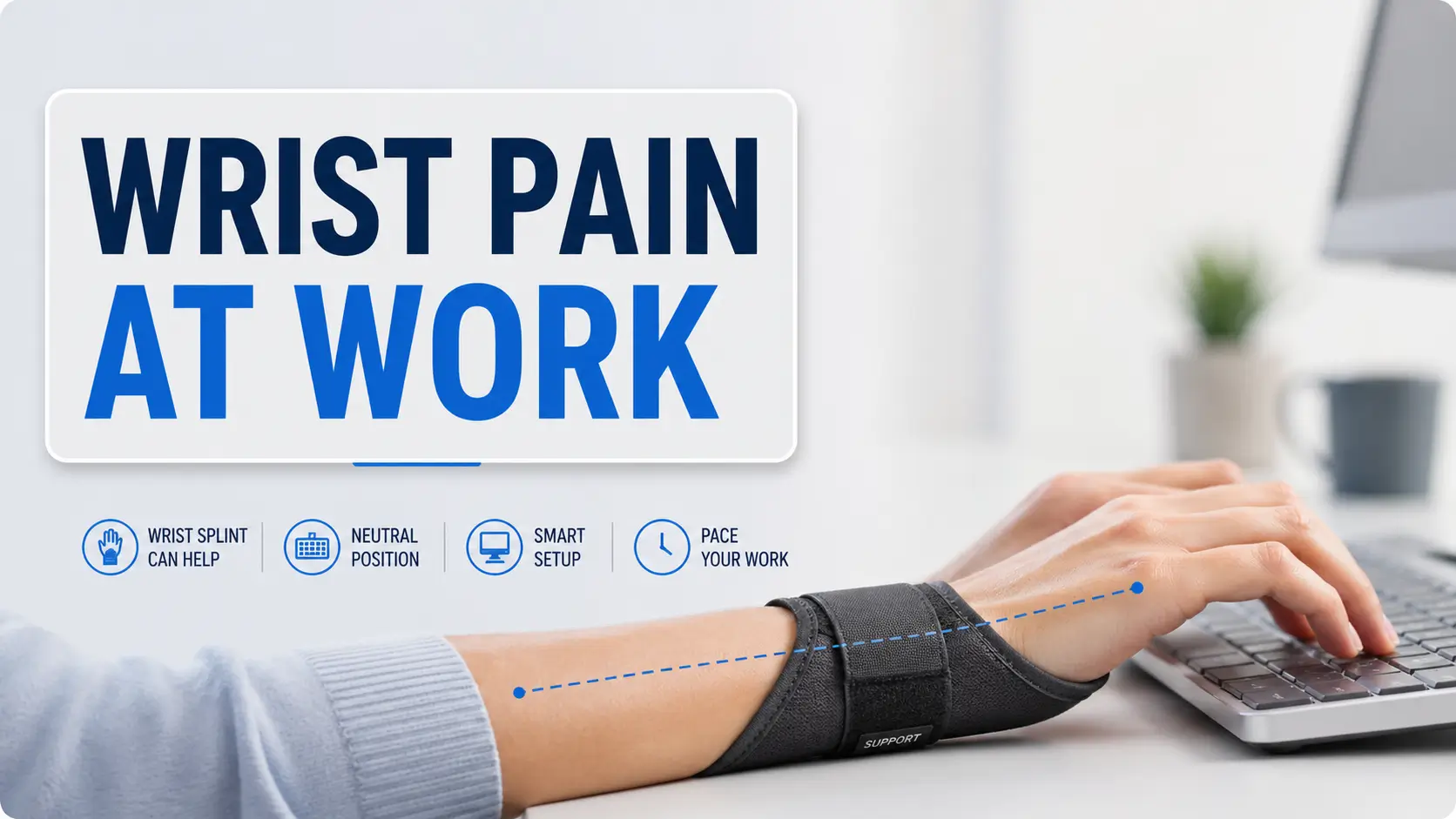
Beyond the Brace: Navigating Wrist Pain in a Digital Workspace
That daily friction isn’t just an inconvenience—it’s a signal.
You sit down to answer one email, and your wrist behaves as if the keyboard has been personally rude to it. It’s a quiet pattern of aching, tingling, and “just one more thing” work blocks that keep adding kindling to the fire.
A wrist splint can help, but it should be a support, not a permission slip to keep aggravating the problem. Without a plan, you risk wasting money on the wrong gear or turning a fixable workstation issue into a chronic struggle.
This guide provides a practical approach to:
- Identifying symptom patterns and workstation checks.
- Optimizing splint fit and pacing.
- Recognizing when numbness or weakness requires professional care.
Table of Contents
Fast Answer
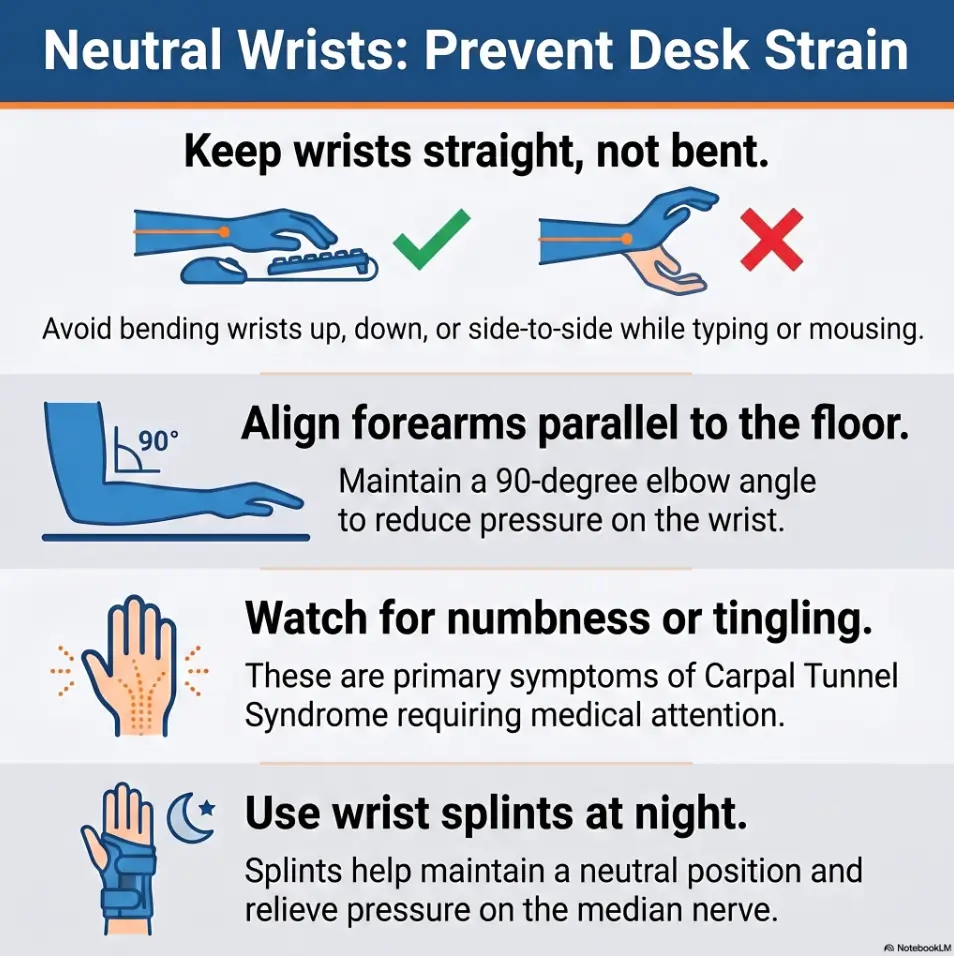
A wrist splint may help typing-related wrist pain when it keeps the wrist near neutral, especially if symptoms suggest carpal tunnel irritation or nighttime flare-ups. But a splint is not a magic cast. Safer pain management usually combines neutral wrist positioning, keyboard and mouse changes, timed breaks, activity pacing, and medical evaluation if pain, numbness, weakness, swelling, or sleep disruption persists.
- Keep the wrist close to neutral, not bent up, down, or sideways.
- Change the workload, not just the gear.
- Seek help early for numbness, weakness, swelling, or sleep-disrupting symptoms.
Apply in 60 seconds: Put your hands on the keyboard and check whether your knuckles, wrist, and forearm form one calm line.
Safety / Disclaimer: A Wrist Splint Is Support, Not a Diagnosis
A wrist splint can be useful, but it does not know why your wrist hurts. It cannot tell tendon irritation from nerve compression. It cannot detect a fracture, inflammatory condition, infection, or a flare that needs professional care. A splint is a seatbelt, not a mechanic.
Use This as Education, Not Personal Medical Advice
This guide is for general education. It can help you ask better questions, set up your desk more intelligently, and avoid common splint mistakes. It cannot examine your wrist, test grip strength, check sensation, or review your medical history.
I have watched people make two opposite mistakes with typing pain. One person buys a brace and keeps typing harder because the brace feels official. Another person panics, stops using the hand completely, and becomes afraid of normal movement. Both reactions are understandable. Neither is a complete plan.
Why “Typing Pain” Can Mean Several Different Problems
Typing-related wrist pain may come from irritated tendons, compressed nerves, joint strain, overuse, awkward mouse reach, poor keyboard height, or a non-work problem that typing merely reveals. Pain can also travel. A shoulder or neck position may change how your forearm behaves at the desk, especially when neck pain from laptop work quietly changes the whole upper-body chain.
The useful question is not, “Is typing bad?” The useful question is, “Which position, tool, duration, or symptom pattern is making this worse?” That is where a splint can help. It reduces one variable: wrist motion.
The No-Guessing Rule for Numbness, Weakness, or Swelling
If your symptoms include numbness, tingling, weakness, dropping objects, visible swelling, spreading pain, or trouble sleeping, do not treat the splint as a private courtroom where you cross-examine your wrist for three more weeks. Get checked.
- Pain only after long typing: start with workload, posture, and short tests.
- Night tingling: consider medical guidance, especially if repeated.
- Weak grip or dropping items: do not wait.
- Swelling after injury: self-management is not enough.
Start Here: Your Wrist Is Asking for a Smaller Workload
Typing pain often appears before you think you have done anything dramatic. No heroic fall. No cinematic injury. Just 42 tabs, a deadline, a mug of reheated coffee, and a wrist that begins sending tiny complaint letters.
Why Typing Pain Often Shows Up Before You “Injure” Anything
Repetitive work is sneaky because each individual movement feels small. One keystroke is nothing. Thousands of keystrokes, plus mouse reach, plus a tense shoulder, plus a wrist bent on the desk for 3 hours, becomes a different animal.
The wrist may not be asking for total rest. Often, it is asking for a smaller dose: fewer long blocks, better angles, more task rotation, and less pressure from hard desk edges. Think of it as lowering the volume before the speaker crackles.
The Splint’s Real Job: Reduce Irritation, Not Prove Toughness
A wrist splint should help your wrist stay calmer while you adjust the rest of the system. It is not there to prove you are serious. It is not there to let you continue an unreasonable workload. It is definitely not there to make your hand feel like it joined a medieval committee.
When the splint works well, it does something modest and valuable: it limits irritating wrist positions. That can be especially helpful at night, when people unknowingly sleep with wrists bent. It may also help during specific tasks that usually trigger symptoms.
Pain Relief Has Two Levers: Position and Exposure
Most typing pain plans fail because they only pull one lever. They buy a brace but keep the same workload. Or they take breaks but keep typing with wrists bent backward. Safer pain management usually needs both:
- Position: wrist closer to neutral, mouse closer, shoulders relaxed.
- Exposure: shorter typing blocks, task rotation, fewer all-or-nothing work sprints.
- Recovery: enough time between heavy sessions for symptoms to calm.
Typing Pain Control Triangle
①
Splint Support
Neutral wrist, less bending, calmer night positioning.
②
Desk Setup
Keyboard height, mouse reach, forearm alignment, softer edges.
③
Workload Pacing
Shorter blocks, break timing, symptom tracking, task rotation.
Best result: all three parts work together. A splint alone is a small umbrella in a large storm.
Who This Is For / Not For
This guide is for people who type, mouse, scroll, write, code, chart, grade, message, design, or manage paperwork until the wrist starts acting like a tired stagehand pulling the curtain early.
Good Fit: Mild to Moderate Typing Pain That Improves With Rest
You may be a good fit for self-management steps if your discomfort is mild to moderate, appears during or after keyboard work, and improves when you rest or change position. That pattern does not make the pain imaginary. It simply suggests you may have room to adjust workload and mechanics.
A common example: the wrist aches after a long spreadsheet session, settles by evening, then returns during another long typing block. That is useful information. It tells you the problem may be dose-sensitive. For people whose symptoms are part of a broader home-office pattern, a guide to orthopedic pain management for remote workers can help connect the wrist problem to the desk, chair, screen, and pacing habits around it.
Possible Fit: Night Tingling, Wrist Ache, or Mouse-Heavy Flare-Ups
A splint may be worth discussing or trying when symptoms worsen at night or when mouse-heavy work triggers tingling, aching, or hand fatigue. The American Academy of Orthopaedic Surgeons explains that keeping the wrist straight or neutral can reduce pressure on the nerve in carpal tunnel syndrome, especially during sleep or aggravating activities.
Still, do not force every symptom into the carpal tunnel box. Bodies are not filing cabinets. Similar discomfort can come from several tissues and movement patterns.
Not Enough: Sudden Injury, Severe Swelling, Loss of Grip, or Spreading Numbness
A store-bought splint is not enough if pain began after a fall, impact, sudden twist, or heavy lift. It is also not enough if swelling is significant, grip is weaker, sensation changes, or symptoms spread into the fingers, forearm, elbow, shoulder, or neck.
Not for “Just Push Through It” Days
Here is the small betrayal: a splint can make you feel safer than you are. If pain is worsening during use, the answer is not a tighter strap and a braver playlist. The answer is to stop, reduce the load, and reassess.
- Improves with rest: test setup and pacing.
- Night tingling: consider neutral splinting and medical guidance.
- Weakness, swelling, injury, or spreading numbness: get evaluated.
Apply in 60 seconds: Write down whether your symptoms are pain-only, tingling, numbness, weakness, swelling, or a mix.
The Neutral Wrist: Tiny Angle, Big Consequence
Neutral wrist position sounds boring, which is unfair. Neutral is not boring. Neutral is the quiet backstage crew that keeps the performance from collapsing.
What Neutral Actually Means at a Keyboard
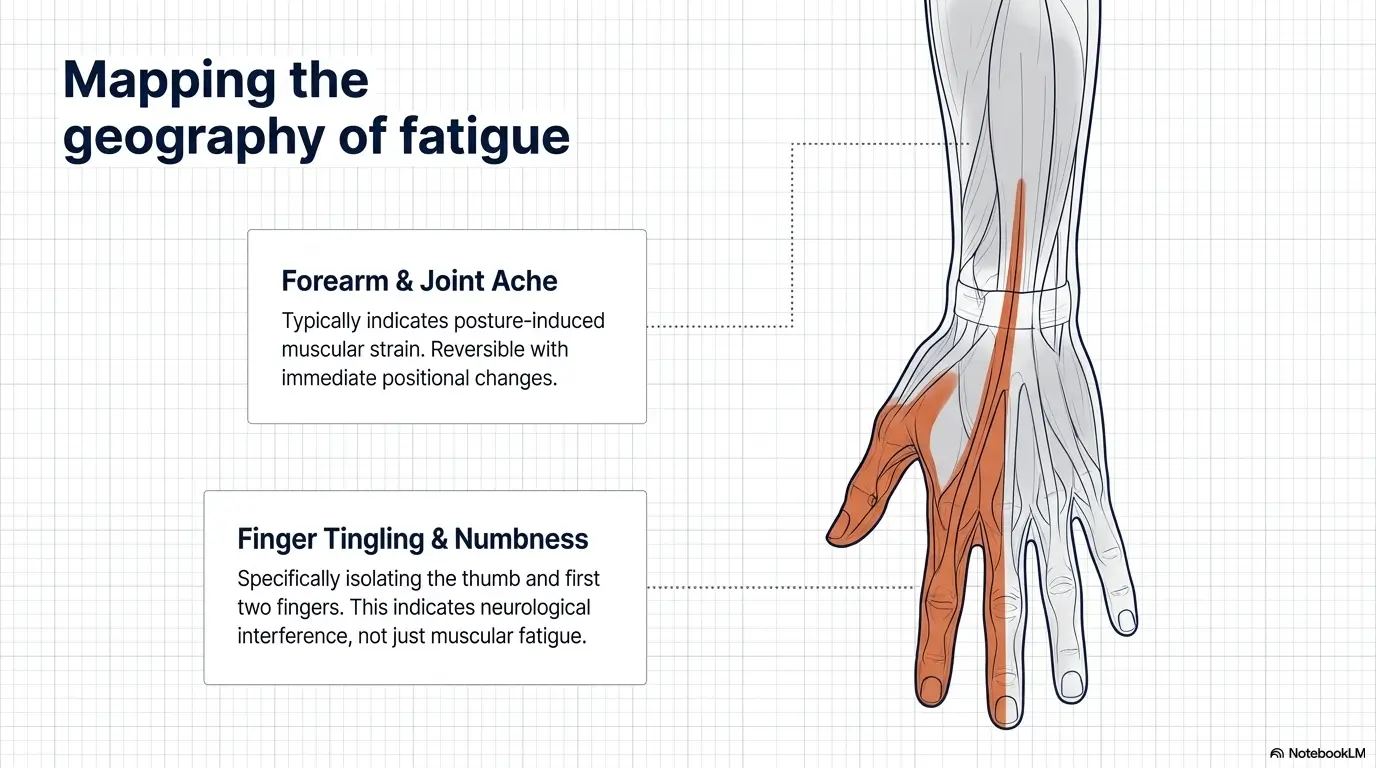
A neutral wrist is close to straight, with the hand, wrist, and forearm lined up. Your wrist is not bent sharply upward toward your face, downward toward the desk, or sideways toward the little finger or thumb.
When you type, your fingers should do most of the small movement. Your wrist should not be doing a dramatic balcony scene over the keyboard. If your wrist has to hover high, press down, or bend around the edge of a laptop, the splint may reduce motion but not solve the angle.
Why Bent Wrists Make Splints Less Useful
A splint can hold the wrist closer to neutral, but only if the workstation allows it. If the keyboard is too high, the chair is too low, or the laptop is forcing your elbows into odd positions, the splint may simply move the strain somewhere else.
I once watched someone put on a wrist brace, then continue typing on a laptop perched on a stack of books while their shoulders climbed toward their ears. The brace was doing its best. The desk was writing comedy.
The Keyboard Height Test: Are Your Forearms Fighting the Desk?
Sit at your normal workstation and let your shoulders drop. Place your fingers on the home row. Your elbows should stay close to your sides, and your forearms should feel roughly level or gently sloped. If your wrists bend up to reach the keys, the keyboard may be too high. If your shoulders slump forward to reach, the keyboard may be too far away.
Try this 30-second test:
- Relax your shoulders.
- Place elbows near your sides.
- Put fingers on the keys without typing.
- Look at the wrist line from forearm to knuckles.
- Adjust chair, keyboard, or arm position before blaming your wrist.
Let’s be honest: the keyboard is often innocent, but the setup is not.
Many people blame the keyboard because it is visible. But the villain may be chair height, desk edge pressure, mouse distance, laptop angle, or the fact that you have typed for 2 hours without changing tasks. The keyboard is sometimes just the messenger wearing plastic keys.
Show me the nerdy details
Neutral wrist positioning matters because wrist flexion, extension, and side bending can change pressure and load across tissues in the wrist and hand. For possible carpal tunnel symptoms, neutral positioning is often used to reduce pressure on the median nerve. For tendon irritation, neutral positioning may reduce friction and repeated strain during long tasks. The goal is not perfect stillness. The goal is fewer high-irritation angles repeated hundreds or thousands of times.
Choosing a Wrist Splint Without Buying a Tiny Prison
The best wrist splint for typing pain is usually not the biggest one in the aisle. Bigger can feel more serious, the way a giant suitcase feels more prepared for a weekend trip. But more brace is not always more help.
Look for Neutral Support, Not Maximum Stiffness
For many typing-related wrist problems, the basic goal is to keep the wrist near neutral. Look for a splint that supports the wrist without crushing the palm, blocking finger movement, or forcing the hand into an awkward angle.
A rigid metal stay can help limit wrist bending, but the fit matters. If the splint holds your wrist in extension, presses into your palm, or makes your fingers work harder, it may increase irritation during typing.
Day Splint vs. Night Splint: Different Jobs, Different Rules
A night splint often prioritizes preventing wrist bending during sleep. It may be bulkier because you are not typing with it. A day splint for computer work usually needs to be lower profile so your fingers can move freely and your palm can avoid hard pressure.
| Use Case | Better Splint Priority | Watch Out For |
|---|---|---|
| Night tingling | Neutral wrist hold | Too-tight straps or bent wrist angle |
| Typing support | Low-profile wrist stability | Bulk that forces awkward fingers |
| Thumb pain | Possible thumb support | Buying wrist-only support for thumb-driven symptoms |
When a Bulky Brace Makes Typing Worse
If the splint lifts your palm off the desk so much that your fingers have to claw at the keys, it may create new pain. If the brace edge presses into your forearm, palm, or thumb web space, it may trade one problem for another.
A simple rule: after 10 minutes of typing, the splint should not create a new hot spot. If it does, stop the test. Gear should not win an argument against your skin. If cost is part of the decision, it may also be worth checking whether braces and supports may be HSA eligible before buying more gear than you need.
The Thumb Question: Do You Need Thumb Support or Wrist Support?
Pain near the thumb side of the wrist can involve different structures than pain centered at the wrist or tingling into the fingers. A wrist-only splint may not control thumb movement. A thumb spica splint may help certain thumb-side problems, but it can also interfere with typing and mouse use.
If the main pain is at the base of the thumb, around the thumb tendons, or with pinching and gripping, consider getting a clinician or hand therapist to identify what kind of support actually matches the problem.
- Night splints can be more supportive.
- Typing splints should not block finger motion.
- Thumb-side pain may need a different design.
Apply in 60 seconds: Before buying, decide whether your main problem is wrist bending, finger tingling, thumb pain, or mouse-triggered ache.
How to Type With a Wrist Splint Without Creating New Pain
Typing with a splint should feel quieter, not more heroic. If the brace makes every keystroke feel like your hand is operating machinery from the Victorian era, pause and reassess.
Keep the Wrist Quiet, Let the Fingers Work
The wrist should stay relatively quiet while the fingers move. Avoid planting the wrist hard on the desk and pivoting from that pressure point. That can irritate soft tissues and compress sensitive areas.
Try floating lightly from the forearms when typing, with brief rests between bursts. Your wrists do not need to hover dramatically above the keyboard like tiny helicopters. They simply should not be pinned into a hard edge.
Use Short Typing Blocks Instead of One Long Hero Session
For the next few days, test shorter typing blocks. A practical starting point is 10 to 20 minutes of focused typing, followed by 1 to 3 minutes of task change. That could mean reading, dictating, standing, stretching gently, or switching to a lower-hand-load task.
This is not laziness. It is dosage control. No one complains that medicine comes with a dose, but somehow office work is expected to be swallowed by the bucket.
Mouse First: The Hidden Pain Multiplier
Many “typing pain” problems are actually mouse problems wearing a keyboard costume. A faraway mouse can pull the shoulder forward, rotate the forearm, bend the wrist sideways, and keep the hand gripping for long periods.
Move the mouse closer than feels necessary. Keep it near the keyboard. Consider alternating hands for simple browsing, using keyboard shortcuts, or testing a vertical mouse if standard mouse use reliably triggers symptoms. The same principle shows up in lower-back desk setups too: smart keyboard and mouse placement for desk-job pain often reduces strain by making the body reach less and recover more.
Here’s what no one tells you: the splint may expose the bad habit it cannot fix.
A splint can reveal that you were bending your wrist, overreaching for the mouse, pressing into the desk, or typing with shoulders locked. That is useful. The splint is not failing when it shows you the real problem. It is turning on the kitchen light.
Mini Calculator: Your Typing Load Snapshot
Neutral action: Use the number to plan tomorrow’s first reduction, not to judge yourself.
Common Mistakes That Make Wrist Splints Backfire
A wrist splint can help, but it is also surprisingly easy to use badly. Small errors become large when repeated all day, which is basically the unofficial constitution of desk work.
Mistake 1: Wearing It So Tight Your Hand Complains
A splint should feel secure, not like it is trying to win a debt collection case against your circulation. If your fingers become cold, discolored, swollen, numb, or more tingly, loosen it and stop using it until you can reassess fit.
Mistake 2: Using the Splint to Keep Typing Through Worsening Symptoms
This is the classic trap. Pain decreases a little, confidence increases a lot, and suddenly the brace becomes permission to type through warning signs. If symptoms worsen while using the splint, the plan needs adjustment.
Mistake 3: Resting Your Wrist Hard on the Desk While Typing
Wrist rests are for pauses, not for pressing your wrist down while fingers sprint across the keyboard. Hard resting can increase local pressure and encourage awkward pivoting.
Mistake 4: Treating Night Relief as Permission for Daytime Overuse
If a night splint helps you wake with less tingling or ache, that is good news. But it does not erase the day’s workload. Night relief is a recovery clue, not a blank check.
Mistake 5: Ignoring the Mouse, Phone, and Trackpad
Your wrist does not care whether the irritation came from an email, a gaming mouse, a phone scroll, or a trackpad marathon. It only receives the load. Check all hand-heavy tasks, not just typing.
- Secure is good; tight is not.
- Wrist rests belong between typing bursts.
- Mouse and phone use count as wrist workload.
Apply in 60 seconds: Loosen the straps, type 3 sentences, and check whether any new pressure point appears.
Ergonomics That Actually Pair With a Splint
Ergonomics does not have to mean buying a spaceship chair. Sometimes it means moving the mouse 4 inches closer and admitting the laptop-on-couch arrangement has become a small domestic crime scene.
Raise or Lower the Keyboard Before Blaming Your Wrist
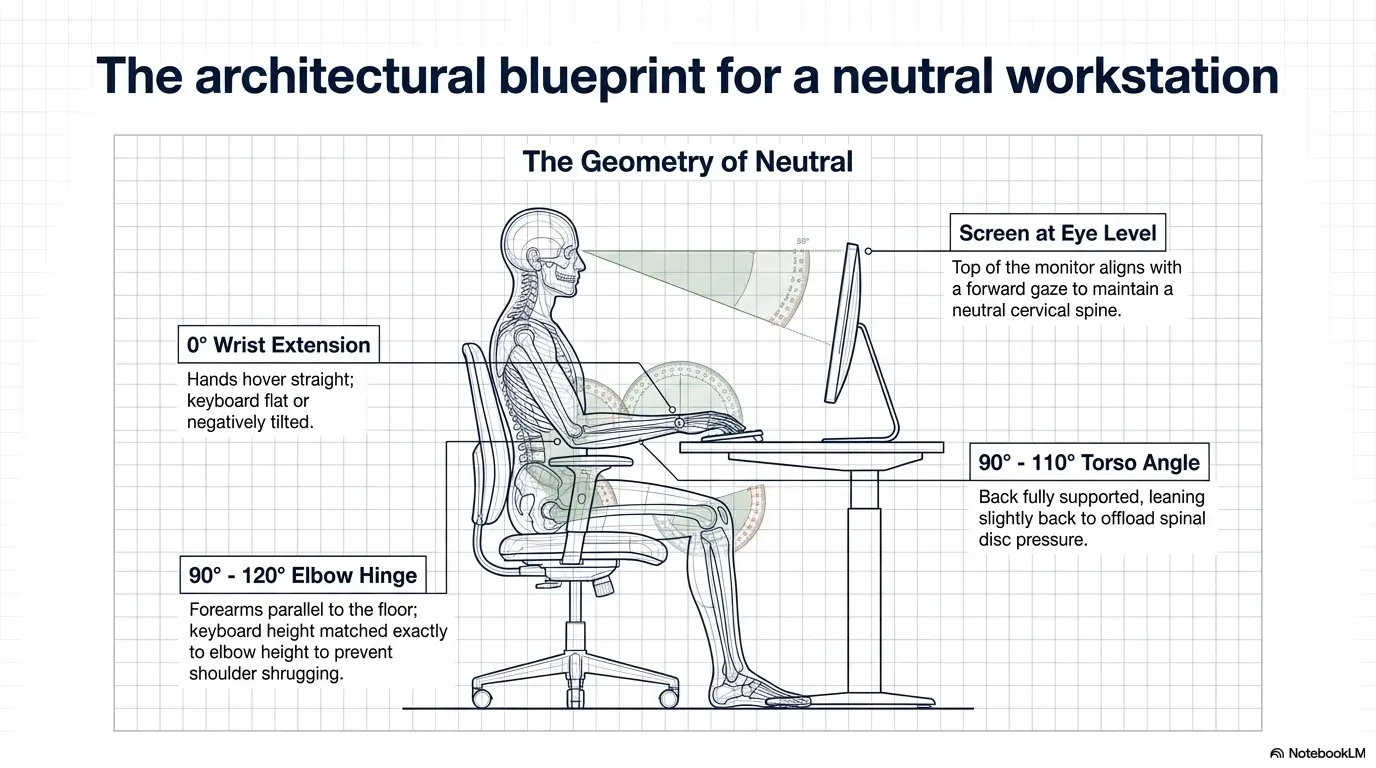
Keyboard height should let your wrists stay straight and your shoulders relax. If the desk is too high, consider raising your chair and supporting your feet. If the keyboard is too far away, bring it closer so your elbows stay near your sides.
OSHA’s computer workstation guidance describes a good working position as one where the hands, wrists, and forearms are straight, in-line, and roughly parallel to the floor. OSHA also notes that wrist or palm supports may help comfort and neutral wrist angles when used properly.
Keep Wrists, Hands, and Forearms in One Line
Look down during typing. If your hands angle outward or your wrists bend toward the little finger side, the keyboard may be too narrow, too centered for your shoulder width, or too far away. A split keyboard may help some people, but it is not automatically necessary.
Use Wrist Rests for Pauses, Not as a Typing Crutch
A soft wrist rest can be helpful during pauses. During active typing, heavy pressure on the wrist rest may encourage compression and awkward movement. Let the fingers work. Let the wrist stay relaxed. Let the wrist rest be a bench, not a steering wheel.
Move the Mouse Closer Than You Think
The mouse should live near the keyboard, not in a different zip code. If you reach forward or sideways hundreds of times daily, your wrist and shoulder may both join the complaint department. If your monitor and laptop height are also forcing awkward posture, compare the tradeoffs in a laptop stand vs. external monitor setup before buying another small fix for a full-system problem.
Eligibility Checklist: Is Your Setup Ready for Splint Testing?
- Yes/No: Can your wrist stay straight while fingers rest on the keys?
- Yes/No: Is your mouse close enough that your elbow stays near your side?
- Yes/No: Can you type without pressing the wrist hard into an edge?
- Yes/No: Can you take a 1-minute break before symptoms spike?
Neutral action: If you answer “no” twice or more, adjust the workstation before judging whether the splint works.
Pain Tracking: The 3-Minute Wrist Log That Beats Vague Guessing
“My wrist hurts sometimes” is emotionally true and practically slippery. A small wrist log turns fog into furniture. Suddenly you can see what triggers symptoms, what helps, and whether the trend is improving or getting louder.
Track When Pain Starts, Not Only How Bad It Gets
Do not only record peak pain. Record the time when symptoms first appear. If pain starts after 12 minutes on Monday and after 8 minutes on Tuesday, that matters. If pain starts after 45 minutes after you move the mouse closer, that matters too.
Separate Typing Pain From Mouse Pain
Use two columns: keyboard and mouse. Many people discover that their typing is tolerable, but mouse work sets off symptoms faster. That discovery can save money because you stop buying keyboards to solve a pointer problem.
Record Night Symptoms, Morning Stiffness, and Grip Changes
Night symptoms can be important, especially tingling or numbness. Morning stiffness, dropping objects, or trouble opening jars can also change the level of concern. Write these down plainly.
The “Two Days in a Row” Warning Signal
If symptoms worsen 2 days in a row despite lighter use and better positioning, do not keep escalating your DIY strategy. Reduce aggravating tasks and consider professional input, especially with numbness, tingling, weakness, swelling, or sleep disruption.
| Log Item | What to Write | Why It Matters |
|---|---|---|
| Start time | Pain began after 18 minutes | Shows workload tolerance |
| Trigger | Mouse-heavy spreadsheet | Separates keyboard from mouse load |
| Symptom type | Ache, tingling, numbness, weakness | Helps decide urgency |
| Recovery | Settled after 20 minutes away | Shows whether pacing helps |
Short Story: The Spreadsheet That Told the Truth
A remote worker once told me her wrist pain came from typing reports. But her 3-minute log told a stranger story. The pain did not begin during writing. It began during the spreadsheet cleanup afterward, when she used a trackpad for tiny drag-and-drop edits.
Her wrist bent sideways, her shoulder crept forward, and her hand gripped the edge of the laptop like it was negotiating with a cliff. She did not need a more dramatic brace first. She needed an external mouse closer to her body, keyboard shortcuts, shorter edit blocks, and a night splint only for the tingling that woke her at 3 a.m. The log did not cure her wrist. It gave her a map. That is often the first useful relief: not magic, just direction.
When to Seek Help: Do Not Wait for the Wrist to Shout
The wrist is polite until it is not. Many people wait for dramatic pain before asking for help, but nerve symptoms and functional changes deserve attention earlier than pride prefers.
Get Checked if Symptoms Interfere With Work, Sleep, or Daily Tasks
If wrist or hand symptoms interfere with normal work, sleep, cooking, dressing, driving, caregiving, or household tasks, it is time to involve a healthcare professional. Mayo Clinic advises care for carpal tunnel symptoms that interfere with usual activities or sleep because untreated nerve compression can lead to lasting nerve and muscle damage.
Pay Attention to Numbness, Tingling, Weakness, or Dropping Objects
Pain is one signal. Numbness, tingling, weakness, and dropping objects are different signals. They may suggest nerve involvement or reduced hand function. Do not let a brace turn those symptoms into background noise.
See a Clinician if Pain and Swelling Last More Than a Few Days or Worsen
For wrist pain more broadly, Mayo Clinic advises seeing a healthcare professional when pain and swelling last longer than a few days or become worse. This is especially important after injury, impact, or a sudden change in function.
Ask About Hand Therapy, Diagnosis, and Fit Before Escalating Gear
If symptoms persist, ask about diagnosis, brace fit, activity modification, hand therapy, and whether specific exercises are appropriate. Do not simply keep upgrading to stiffer gear. The goal is better function, not a wrist wrapped like a holiday parcel.
- Sleep disruption matters.
- Numbness, tingling, and weakness deserve attention.
- Swelling that lasts or worsens should not be ignored.
Apply in 60 seconds: Decide whether your symptoms are affecting sleep, work, grip, or daily tasks. If yes, plan care instead of another brace test.
FAQ
Can a wrist splint help typing pain?
Yes, a wrist splint may help some typing-related wrist pain, especially when symptoms are aggravated by wrist bending or when nighttime positioning causes tingling or aching. It works best when paired with neutral wrist alignment, keyboard and mouse changes, and reduced long typing blocks.
Should I wear a wrist splint while typing or only at night?
It depends on your symptom pattern and diagnosis. Night splinting is often used to keep the wrist from bending during sleep. Daytime splinting may help during specific aggravating tasks, but a bulky brace can make typing worse if it changes finger motion or creates pressure points.
How tight should a wrist splint be?
Snug, not tight. Your fingers should not become cold, discolored, swollen, numb, or more tingly. You should be able to move your fingers comfortably. If the brace leaves deep marks or causes new symptoms, loosen it and reassess the fit.
Can typing with a splint make wrist pain worse?
Yes. A splint can make pain worse if it is too tight, too bulky, poorly angled, or used as permission to keep typing through worsening symptoms. It can also shift strain into the fingers, thumb, elbow, or shoulder if the workstation is poorly arranged.
What kind of wrist splint is best for computer work?
For computer work, many people need a low-profile splint that supports a neutral wrist while allowing finger movement. A night splint can be more supportive because you are not typing. Thumb-side pain may require a different style, such as thumb support, but that should match the actual problem.
Is wrist pain from typing always carpal tunnel syndrome?
No. Typing-related wrist pain can involve tendons, joints, nerves, muscles, swelling, referred pain, injury, or workstation strain. Carpal tunnel syndrome is one possibility, especially with numbness or tingling in certain fingers, but self-diagnosis can be misleading.
How long should I try a wrist splint before seeing a doctor?
If symptoms are mild and improving, a short trial paired with ergonomic changes may be reasonable. But do not wait if you have numbness, tingling, weakness, swelling, worsening pain, dropping objects, symptoms after injury, or sleep disruption. Those signs deserve professional evaluation. Depending on timing, severity, and access, comparing telehealth vs. in-person orthopedics may help you choose the first care step without turning the decision into another source of stress.
Should I use ice, heat, or medication with a wrist splint?
Some minor strains may feel better with rest, ice, heat, or over-the-counter pain relievers, but the right choice depends on the cause and your health history. Ask a clinician or pharmacist if you have medical conditions, take other medicines, or symptoms persist.
Can ergonomic keyboards or vertical mice reduce wrist pain?
They can help some people, especially when standard devices force awkward wrist angles or far reaches. But the best device depends on your hands, desk, work style, and symptoms. Test one change at a time so you know what actually helps.
Next Step: Run a 10-Minute Neutral Wrist Audit Today
Remember the opening email that made your wrist feel betrayed? The answer is not to freeze your life. The answer is to make the next 10 minutes more honest than the last 10 days.
Put on the Splint and Type One Short Paragraph
Choose a short, ordinary typing task. Not your biggest deadline. Not a 4,000-word document. Type one paragraph while wearing the splint and notice whether your wrist stays neutral without new pressure points.
Check Wrist Angle, Shoulder Tension, Mouse Reach, and Pain Timing
Look at the whole chain. Are shoulders relaxed? Elbows near your sides? Mouse close? Wrists straight? Pain starting at minute 3, 8, or 20? Your wrist is part of a system, not a lone violin forced to play over the whole orchestra.
Write Down One Change You Will Test Tomorrow
Pick one change. Move the mouse closer. Lower the keyboard. Shorten typing blocks. Try night splinting if that matches your symptoms. Call a clinician if red flags are present. One clean test beats five anxious purchases.
Decision Card: Splint Test vs. Clinician Visit
| Choose This | When It Fits | Next Step |
|---|---|---|
| 10-minute splint and setup test | Mild ache, improves with rest, no red flags | Track pain start time and adjust desk setup |
| Medical evaluation | Numbness, tingling, weakness, swelling, injury, sleep disruption, worsening symptoms | Ask about diagnosis, hand therapy, and proper splint type |
Neutral action: Match the next step to the symptom pattern, not to how busy your week looks.
Final CTA: Within the next 15 minutes, run the neutral wrist audit: splint on, one short paragraph, mouse close, wrist straight, pain timing noted. If the test creates new pain or your symptoms include numbness, tingling, weakness, swelling, or sleep disruption, stop treating the brace as the whole plan and arrange professional care.
Last reviewed: 2026-04.